Foxit Resource Hub

Main navigation

  • Foxit PDF Editor for Windows
  • Foxit PDF Editor for Windows
  • Home
    • Foxit PDF Editor for Windows (Manual Menu-test)
User account menu
  • Log in
By cynthia_chen, 6 January, 2026

Foxit Deployment Security Overview

Foxit Software is committed to building secure, reliable, and trustworthy products through a mature and continuously improving Secure Software Development Lifecycle (S-SDLC). Security and privacy are integrated into every stage of product development and operations, rather than treated as an afterth

11111
Category: Product
Smart Redact
By cynthia_chen, 12 December, 2025

Paragraph Editing

With the Edit Text command, you can edit texts in a paragraph like Microsoft Office Word as well as changing their font, font size and color.

To edit texts in a paragraph, please do the following:

By cynthia_chen, 18 November, 2025

Plug-in Management Platform

This user manual covers all features included in Foxit PDF Editor Subscription Release and Foxit PDF Editor Perpetual Release, hereafter named Foxit PDF Editor. For information on the deployment of Foxit PDF Editor in an enterprise environment, please refer to Foxit PDF Editor Deployment and Configuration.

By cynthia_chen, 18 November, 2025

Workspace Basics

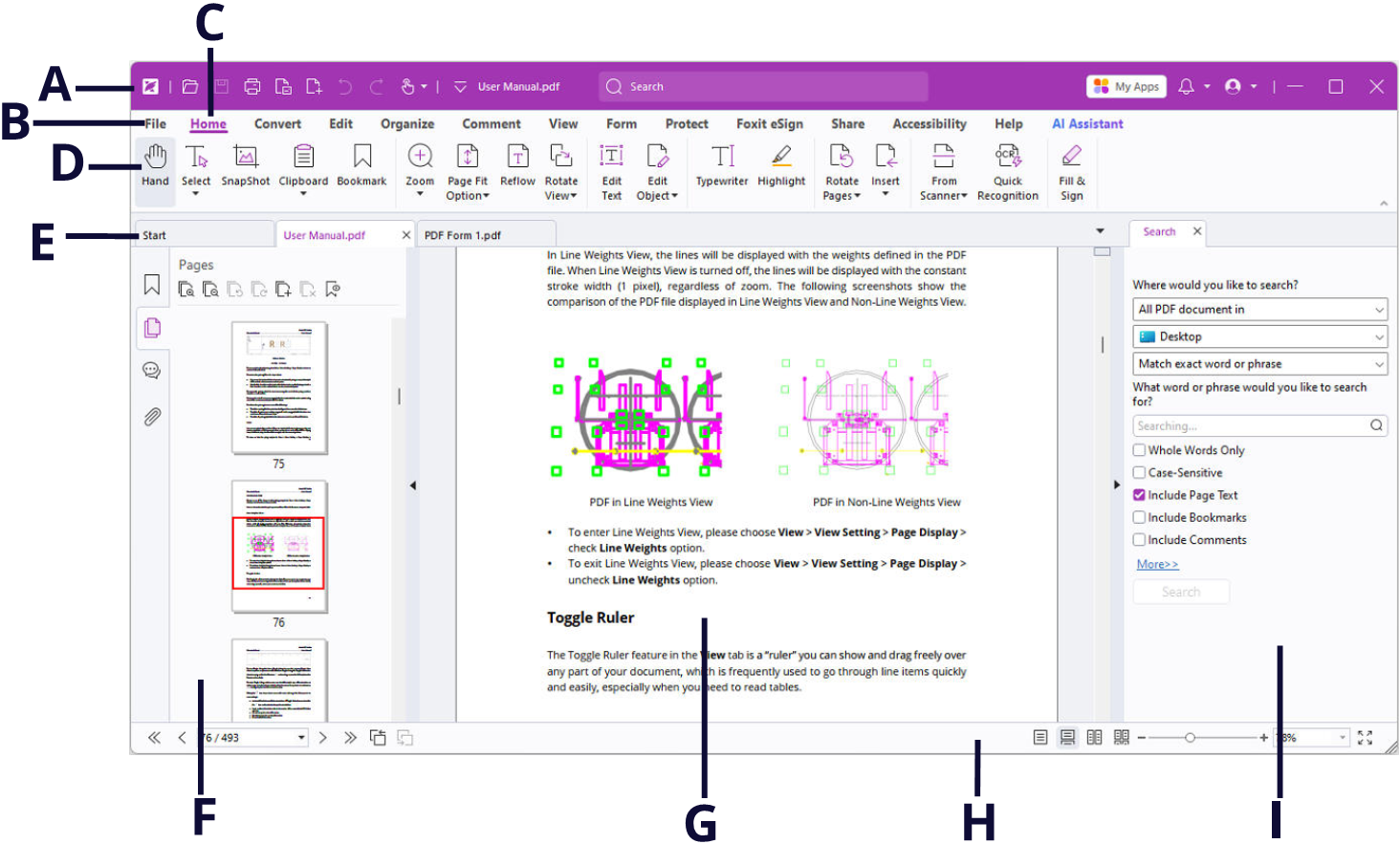
Foxit has integrated the collective commands in the ribbon interface and created a new way of working, namely Ribbon Mode. Ribbon Mode is developed based on Microsoft Office 2013 (Office 15) to provide you with a familiar and intuitive user experience. In this mode, commands are arranged by groups and tasks.


User Interface (Subscription Release)

By cynthia_chen, 18 November, 2025

Page Display

The Page Display panel of the Preferences dialog box includes the following options:

  • Default Layout and Zoom

  1. Navigation tab: specifies the panel to be displayed in the opening view.
    1. Use Initial View: minimizes the Navigation panel and hides all panels.

    2. Page Only: displays Pages panel by default in opening view. 

By cynthia_chen, 18 November, 2025

Signature

  • Default Signing Format: Choose a default signing format based on PKCS#7 or CAdES standard. PKCS #7 - Detached is selected by default. 
  • Appearance Styles: Manage the signature appearance templates.
  • Signing & Verifications
  1. Sign the document immediately after the signature is placed: Check this option to sign the document immediately when you place the signature on the document. By default, this option is checked.
By cynthia_chen, 6 November, 2025

Support Center

Foxit PDF Editor offers an AI-powered customer support center, which acts as an AI chatbot and can provide personalized assistance based on your specific needs. Utilizing natural language processing and machine learning algorithms, the AI chatbot can understand user queries and respond with answers. It can assist you in using a specific function or performing certain tasks by providing step-by-step instructions based on Foxit resources, such as Foxit Knowledge Base. (Tip: The AI chatbot is enabled by default.

By cynthia_chen, 6 November, 2025

Online Tutorials

We offer online tutorials to help you get the most out of our product. Go to Help > Online Tutorial to watch our product tutorials on the Foxit website.

By cynthia_chen, 6 November, 2025

Content-sensitive Help

Content-sensitive Help assists users by providing help based on a specific task they perform. This enables users to get specific information about whatever feature of the application they are using at the given moment. 

To access Content-sensitive Help: 

Hover your mouse over a button, and you will see the tip which gives you the basic instruction of the feature. If Foxit PDF Editor contains additional help about the feature, you can click Tell me more to learn more about it in Help Center. 

By cynthia_chen, 6 November, 2025

Help Center

Help Center helps you navigate top help topics and get help online. To access the Help Center, please click Help > Help Center. In the Help Center, you can find topics by groups based on the features, or input a keyword in the Search box to search for any desired topic.

Pagination

  • Page 1
  • Page 2
  • Page 3
  • Page 4
  • Page 5
  • Page 6
  • Page 7
  • Page 8
  • Page 9
  • …
  • Next page
  • Last page
RSS feed
Powered by Drupal